

Real Estate Photography
How to Test Real Estate Photo Edits With a Repeatable Trial
A small, documented comparison can tell a property-media team more than a collection of impressive before-and-after examples.

Cover: Original AI-generated concept illustration. Not a real client property, tested product output or software interface.
A convincing before-and-after example can make an editing workflow look ready for every property. A useful trial asks a narrower question: can the team get an acceptable result from the kinds of photographs it actually receives, within a workable amount of time?
World Science Day for Peace and Development falls on 10 November, according to UNESCO. It offers a timely reason to bring evidence into everyday production decisions. For property media, that can start with a modest, repeatable comparison rather than an ambitious claim about which tool is best.
Choose one decision to test
Write the decision before selecting images. For example: “Should this workflow handle our routine exposure-correction jobs?” That question has a clearer answer than “Does this software produce beautiful images?” Keep the requested treatment narrow enough that reviewers can agree on success.
Specify the result the business needs, the changes that are allowed, and the changes that would disqualify an output. An exposure adjustment might permit brighter shadows but not an altered window opening. Set those boundaries before seeing results so an attractive output does not quietly redefine the assignment.
Build a small but representative image set
Use authorized photographs from the actual work mix. Include easy examples and difficult ones: a bright room, a dim hallway, mixed lighting, a reflective kitchen, and an exterior with fine detail. Avoid selecting only images that already work well with the workflow being tested.
Save the test set and record why each image is included. NIST's AI Risk Management Framework discussion of validity and reliability emphasizes realistic test sets and documented measurement methods. A small studio trial applies that principle locally; it does not establish universal performance or constitute NIST certification.
Keep the comparison conditions stable
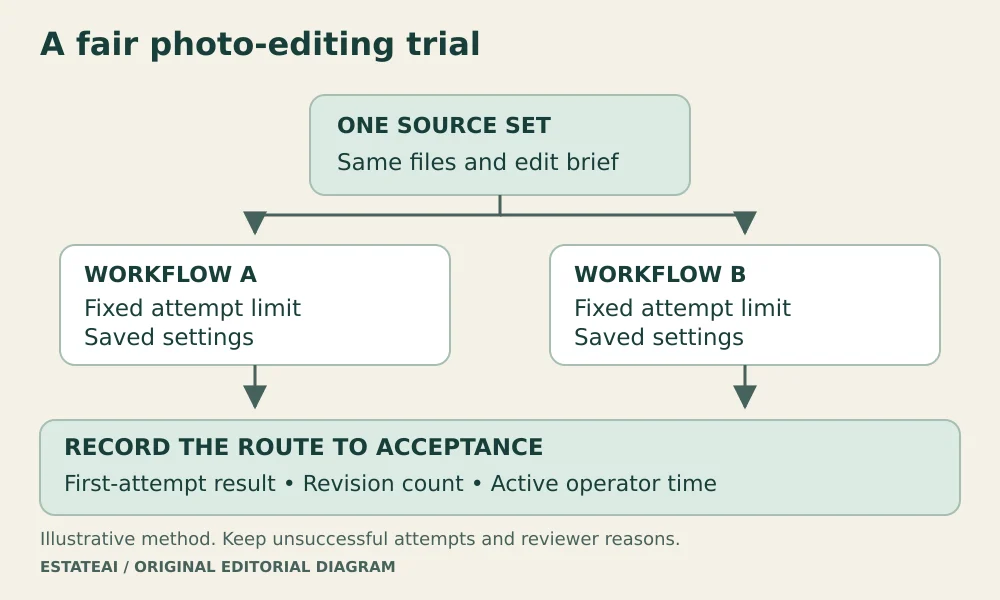
Start each candidate workflow with the same source file. Record the instructions, settings, export requirements, and test date. If one workflow receives a carefully prepared image while another receives a compressed preview, the results answer different questions.
Decide in advance how many attempts are allowed. Save unsuccessful attempts as part of the record. Where practical, label outputs A and B and vary their presentation order so reviewers are less influenced by a preferred product name. Compare at the same display size, with the original available beside each output.
Measure the work needed to reach acceptance
Record more than a visual preference. A practical trial sheet can contain one row per source image and these fields:
- Accepted on the first attempt, accepted after revision, or rejected.
- Active operator time, recorded separately from processing wait time.
- Number of additional attempts and any manual finishing.
- A brief reason for rejection or revision.
Suppose, in an illustrative ten-image trial, six outputs are accepted immediately and three require revisions. Report those counts separately. Calling all nine “successful” without mentioning the extra work would hide a decision that matters to staffing and turnaround. Do not present these example numbers as EstateAI results.
Investigate disagreement before averaging scores
When two reviewers disagree, ask what each person noticed. One may be evaluating attractiveness while the other is checking whether the photographed property still looks accurate. Rewrite unclear acceptance criteria and review the disputed output again.
Keep severity visible. A slight color preference and a changed architectural feature should not disappear into the same average score. Likewise, split results by the image groups you chose. A workflow that performs well on bright interiors may still need a different route for reflective surfaces.
Make a limited decision and keep the record
End with an operational conclusion: use the workflow for a defined image category, require a particular review step, or continue testing. Save the source set, results, reviewer notes, and settings together. Repeat the trial after a material workflow change instead of assuming an old result still applies.
Use the same trial when evaluating EstateAI, by Pixel Perfects Solutions LLC. The published EstateAI image-review checklist can help define acceptance criteria for individual outputs. If a team commissions evaluation software from a developer such as Dotera, include source IDs, review decisions, and revision time in the requirements.
FAQ
Frequently asked questions
How many photographs should a trial include?+
Start with a manageable set that covers your recurring conditions. Expand it when results vary or when an important category is missing. A small trial is a workflow screen, not a statistical guarantee.
Should reviewers know which tool made each image?+
Hide the labels when practical during the first review, then reveal them when discussing time, cost, and workflow fit. Keep the original visible in both stages.
Can this trial predict listing sales?+
No. It evaluates an editing process under defined conditions. Sales and inquiries depend on many factors outside the image-editing trial.
EstateAI
Turn the next property into a complete marketing workflow.
Upload once. Analyze, enhance, stage, review, market, share and deliver from one connected Property Workspace.
Start free