

Real Estate Photography
A File Naming System for Property Photo Versions
Separate the identity of a photograph from its edit version, export format, and approval status so the right file survives every handoff.

Cover: Original AI-generated concept illustration. Not a real client property, tested product output or software interface.
A property folder becomes difficult to trust when it contains final.jpg, final-new.jpg, and final-approved-2.jpg. The problem becomes more serious when two versions look almost identical and nobody can explain which source produced them. A useful property photo file naming system makes those relationships visible.
Start with a few stable fields in a consistent order. The U.S. National Archives naming guidance recommends descriptive, consistent names and fixed positions for elements such as dates and versions. Its guidance addresses federal records; the following property-media convention is a practical adaptation, not a mandatory industry standard.
Give the property and source image stable identities
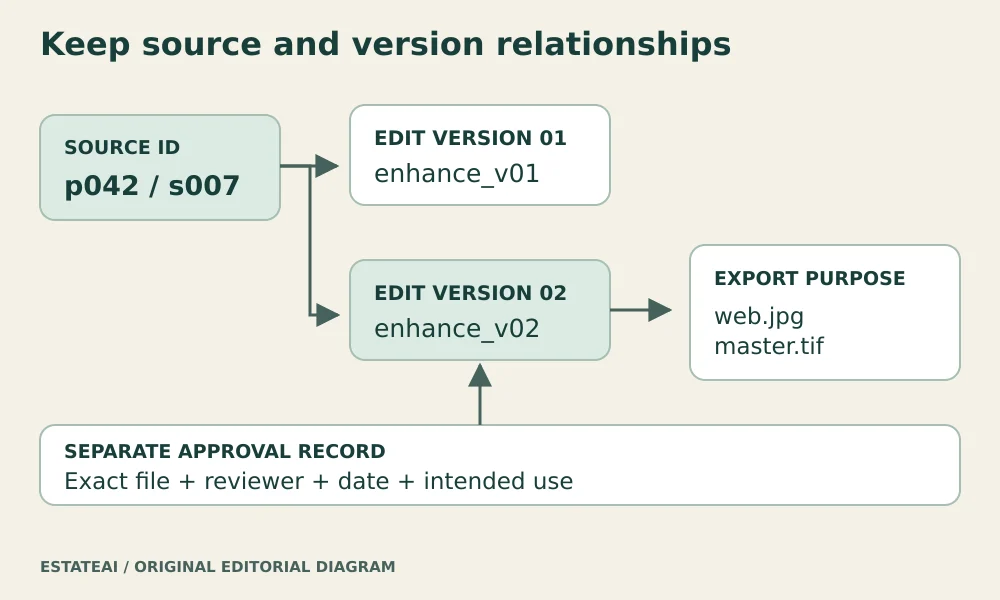
Assign each job a short property or project identifier, such as p042. Within that job, assign each source photograph a stable identifier such as s007. Keep a small index linking that source ID to the original camera filename and capture record.
Retain the untouched original in a protected source folder. If you rename a working copy, preserve the mapping to the original rather than relying on memory. A new photograph of the same room gets a new source ID. A changed room label should not change the identity of an existing photograph.
A short project code also avoids placing a client’s name or full address in every exported filename. Keep the private mapping in the job record. Use an address in a public file only when it is appropriate for the intended destination.
Separate the edit version from the export
For working derivatives, one possible pattern is property_source_treatment_version_output.extension. For example, p042_s007_enhance_v02_web.jpg identifies the second enhancement revision of source seven, exported for a web destination.
A matching p042_s007_enhance_v02_master.tif could be a master export from the same approved edit. These filenames illustrate the relationship; they do not prescribe a file format for every job. Choose actual export formats and specifications according to the client and destination.
Increment the edit version when the visual treatment changes. Changing only a delivery size can use a different output label while retaining the edit version. Document that distinction so one editor does not use v03 to mean a new crop while another uses it for a smaller download.
Define the vocabulary once
Pick a short list of treatment and output labels. Write down what each means, with one valid example. Avoid letting “retouch,” “edit,” and “enhance” become interchangeable names for the same operation unless the team has a reason to distinguish them.
Use a consistent case and separator. Keep names readable, and avoid adding every piece of job information. Room names, photographer details, instructions, and dates can live in the index when including them would make filenames cumbersome. If you use dates, document whether they represent capture, editing, or delivery.
Keep approval in a record that can change
A filename is a poor place for the whole approval history. “Approved” can become outdated after a correction, while “latest” changes whenever another version is created. Use a small approval record linking an exact filename to the reviewer, decision date, intended destination, and any conditions.
For a revised delivery, add a new entry and identify the file it replaces. Keep previously delivered versions in an archive rather than mixing them with the current delivery set. Someone opening the delivery folder should not have to reconstruct the project history to choose a file.
Automate carefully and test a small batch
Photo-management software can reduce manual typing. Adobe documents filename templates in Lightroom Classic, including tokens and custom text for import and export workflows. The available options depend on where the template is used.
Test a few files first. Confirm that names remain unique, the source mapping is intact, and exports land in the expected folder. Avoid renaming catalog-managed originals behind the application’s back without understanding how the application tracks those files. Back up the original files and their mapping before a large reorganization.
Use the same identity across tools
Keep the stable source ID in revision requests, delivery inventories, and client feedback. “Please revise s007, enhancement v02” is easier to act on than “fix the kitchen image.” When a platform provides its own IDs, record the relationship rather than assuming its exported filenames will remain unchanged.
Keep this mapping when working in EstateAI or handing files to Pixel Perfects Solutions LLC. If a developer such as Dotera builds a custom media index, request unique source IDs, version relationships, and an exportable approval record. Check those behaviors with sample files before relying on automated naming across a live job.