

Real Estate Photography
Property Photo Metadata and Privacy Before Sharing
A well-planned metadata policy helps preserve important credits and content authenticity while protecting sensitive information. It ensures public exports retain useful details without exposing unnecessary personal or location data.

Cover: Original AI-generated concept illustration. Not a real client property, tested product output or software interface.
A property photograph can carry information that is not visible in the picture: creator details, a caption, capture information, location fields, or usage instructions. That information can help a team identify and manage an image. It can also expose details that were never intended for a public listing.
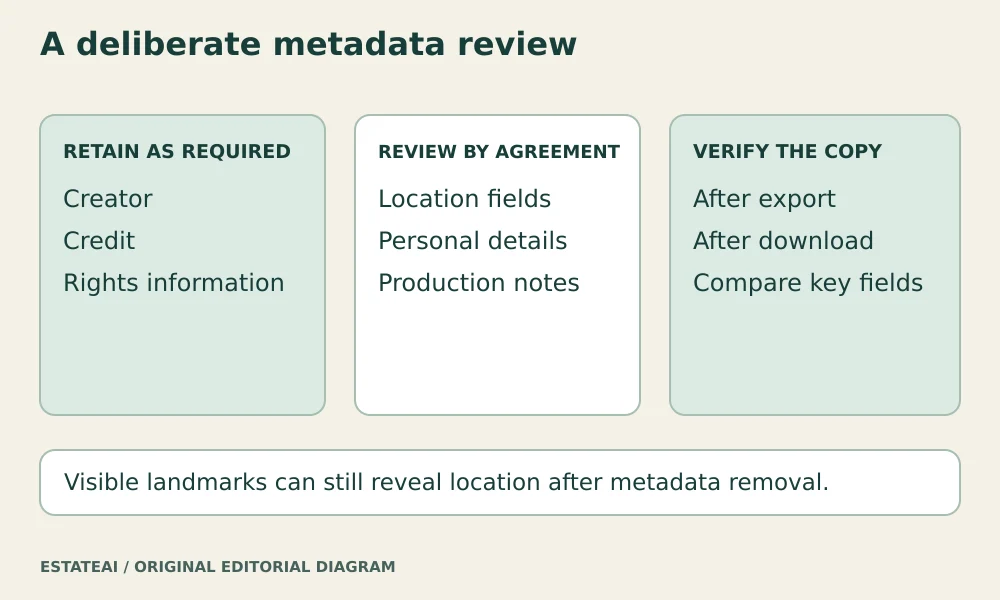
The right approach to property photo metadata is deliberate selection. Preserve information the project needs, respect the photographer’s rights and agreed terms, and check what actually reaches the recipient. Treat the original archive and the public export as different stages with different purposes.
Know what information you are reviewing
The IPTC Photo Metadata standard covers administrative, descriptive, and copyright information about images. In practice, a photographer’s software may present these fields alongside camera information and location data. Read the field values rather than judging privacy from the filename alone.
For a property job, review the creator, credit line, copyright notice, caption, location entries, and any personal contact details. Also inspect free-text notes and keywords. A field that looks like an innocent production note might contain a homeowner’s name or an internal instruction that belongs only in the job record.
Keep ownership and usage information accurate
Do not solve privacy concerns by indiscriminately deleting everything. IPTC’s Photo Metadata User Guide recommends preserving embedded metadata, especially copyright-management information, and agreeing other removals with the copyright holder.
Follow the actual agreement for the photographs. Preserve required credit and rights information, and use approved business contact details when those are needed. Do not replace a photographer’s identity with the listing agent’s name merely because the agent is publishing the image. If fields conflict with the agreed usage terms, resolve the discrepancy before delivery.
Decide which location details belong in the export
A publicly marketed property’s address may already be intentionally disclosed. Even so, the team should decide whether embedded coordinates and location fields are needed for that particular delivery. A private preview, an off-market property, and a public listing may have different requirements.
Record the decision in the delivery brief. If location information should be excluded, apply that rule to the export with the necessary permission, then inspect the resulting file. Keep authorized source records in the private archive rather than destroying context that the production team may need later.
Metadata removal does not make a photograph anonymous. Street signs, house numbers, distinctive views, and landmarks may still reveal location. Google Photos’ location guidance explicitly warns that viewers may infer a place from the visible scene even when location data is not shared.
Understand the export options in the actual tool
Export controls differ between applications and file types. Adobe’s Lightroom Classic export documentation describes metadata choices such as Copyright Only, Copyright and Contact Info Only, and All, plus a Remove Location Info option that removes GPS metadata. The documentation notes exclusions for DNG files.
These labels are a starting point for configuring that application, not proof that every desired field will survive or disappear. For example, selecting only copyright information may leave out a description your recipient needs. Read the documentation for your tool, choose settings deliberately, and examine the actual exported copy.
Check the copy after each important transfer
Keep a small sample file for testing the delivery route. Inspect it before export, after export, and after downloading it from the destination when possible. Compare the fields that must remain with the fields that should be excluded. A thumbnail preview cannot establish what metadata is inside the downloadable original.
For private property photographs, prefer a trusted local metadata viewer over uploading the file to an unfamiliar inspection website. If the destination changes or the export preset is updated, repeat the check. A previously tested route does not establish the behavior of a new one.
Write a short metadata policy for the job
The policy can be brief: who supplies the rights information, which fields public exports need, which location or personal fields are excluded by agreement, and who verifies the final files. Include any required descriptions separately in the handoff so the publisher can check them against the rendered page.
Apply this policy to EstateAI exports and deliveries involving Pixel Perfects Solutions LLC. If a developer such as Dotera implements a custom upload or download workflow, specify the fields to retain and the privacy checks to run. Test the resulting files rather than assuming that a platform preserves or removes particular metadata.