

Real Estate Photography
A Client Handoff Checklist for Property Photo Delivery
Finish a property-media job with a delivery package that tells the recipient which files to use, where they belong, and how to request a correction.

Cover: Original AI-generated concept illustration. Not a real client property, tested product output or software interface.
A client receives a download link containing several dozen property photographs. Some are approved, two are earlier revisions, and a smaller set was prepared for a different destination. The files may look good, but the recipient still has to solve the delivery puzzle before publishing.
A property photo delivery checklist should make the next action obvious. Once visual review is complete, concentrate on the handoff: the exact package, its intended use, the approval record, and access for the right people. A clear delivery record also makes later corrections easier to handle.
Define the package before sending it
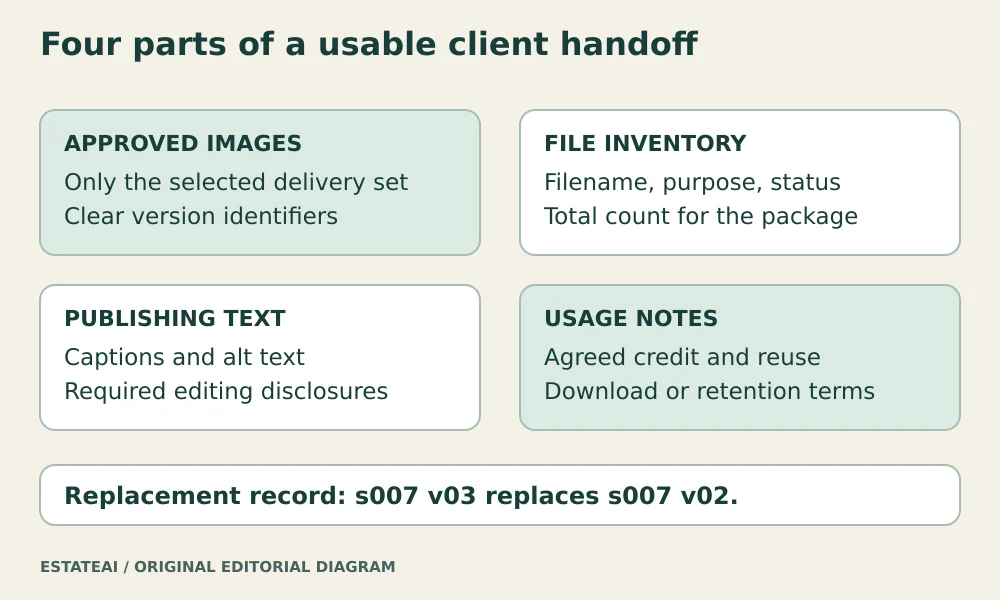
Name the delivery set and give it a date or revision identifier. Separate files intended for publication from review-only alternatives. If the client requested different output sets, label the folders by their purpose using terms the recipient understands.
Include a short inventory. Each entry should identify the filename, source or room reference, edit version, intended destination, and approval status. Add a total file count so the recipient can notice an incomplete download. Keep the inventory specific to the package rather than copying an old job’s template without checking it.
Attach the approval to the exact files
A message saying “the photos are approved” can become ambiguous after a revision. Record which person approved which version and when. If approval has conditions, include them beside the affected image, such as an instruction to use the original photograph alongside a visualization.
The delivery set should contain the selected files, not every intermediate attempt. Keep the full production history in the project archive. If alternatives are included for a reason, place them in a clearly labeled review folder and state whether publication is permitted.
Carry usage information into the handoff
Include the agreed credit wording, relevant usage restrictions, and a reference to the applicable license or client agreement. Do not assume that possession of a download establishes every possible reuse right. When the intended use changes, resolve the question before reusing the files.
The IPTC Photo Metadata User Guide provides a Rights Usage Terms field for usage instructions. Include essential information in the delivery note as well as appropriate metadata so the recipient can find it without opening a specialist viewer. The note should reflect the actual agreement rather than introduce new terms.
Bundle publishing text with the correct image
Supply any approved captions, alt text, and editing disclosures with matching filenames. Keep them in separate fields because they serve different functions. A visible caption may explain a visualization, while the alternative text describes the image’s relevant content.
W3C’s guidance for informative images ties text alternatives to the image’s meaning in context. The publisher should therefore review supplied descriptions on the actual page. If an image is cropped or used as a control, its role may differ from the one assumed during delivery.
Verify the recipient’s access
Check the selected recipients, the shared folder’s contents, and whether the recipient can perform the intended action. A client who only needs to download approved images generally does not need permission to change the production archive. Share only the package they need.
For example, Google Drive’s sharing guidance distinguishes viewing, commenting, and editing permissions and explains that folder permissions are inherited by their contents. Check the actual service and account settings rather than assuming every link works the same way.
Test the delivery route without broadening access just to make testing easier. Where recipient-specific access cannot be verified from your account, ask the recipient to confirm that the intended files open and download. A link copied into an email is not evidence that the full handoff succeeded.
Make corrections traceable
Ask the client to reference filenames in revision requests. When replacing a delivered image, issue a new version and identify the exact older file it supersedes. Tell the recipient whether only that file changed or whether the whole package should be replaced.
Keep a delivery log with the package ID, contents, recipients, date, and replacement history. State any agreed download availability or retention period accurately. Avoid promising permanent storage unless that commitment is part of the service arrangement.
Use the same delivery record for an EstateAI project or a service handoff with Pixel Perfects Solutions LLC. When commissioning a custom client portal from a developer such as Dotera, make recipient permissions, package inventories, and replacement notices explicit requirements. Test them with a sample delivery before the client depends on them.