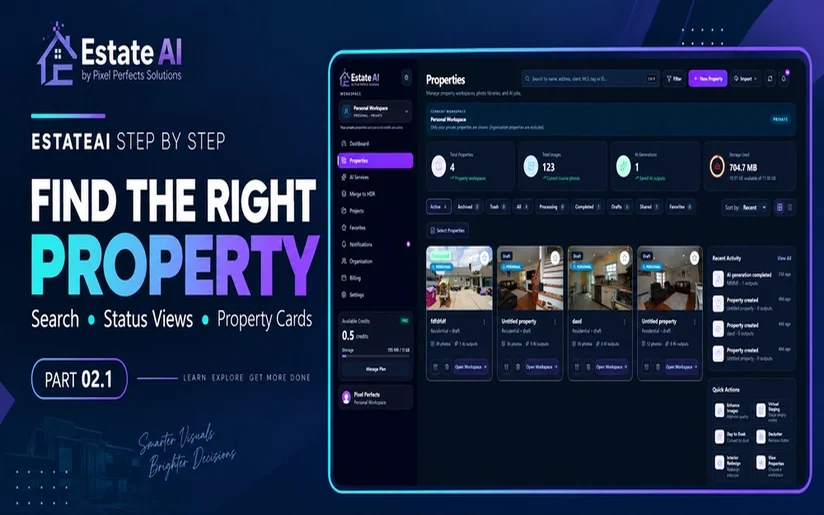
Learn how to find the right property in EstateAI using workspace context, search, property status views and property cards while keeping source photos, AI outputs and real estate editing workflows organized.
EstateAI Editorial TeamSeptember 28, 202620 min readShare
EstateAI Properties Explained: Search, Filters and Property Cards
EstateAI Step by Step · Module 02 · Guide 02.1
Managing real estate photography becomes more complicated as your number of properties, source photos, AI-generated images, drafts and completed projects grows.
A single property shoot can contain dozens of photographs.
Add virtual staging, photo enhancement, decluttering, day-to-dusk editing, interior redesign and multiple generated versions, and suddenly finding the correct property workspace becomes just as important as editing the image itself.
That is where the EstateAI Properties workspace comes in.
EstateAI organizes your real estate media around the property, helping keep source photographs, AI outputs and property-related work connected instead of treating every image as an isolated file.
In this guide, we will explore how to use the EstateAI Properties screen to:
find the correct property;
understand workspace context;
read property statistics correctly;
use search and property status views;
understand property cards;
distinguish source photos from AI outputs;
use Recent Activity and Quick Actions;
avoid creating duplicate property records;
and continue an existing real estate photography workflow.
Explore EstateAI Merge to HDR with real screenshots. Learn the difference between bracket size and image count, understand Auto and 3-, 5- or 7-exposure options, and check your source files and job summary before starting a merge.
Real estate marketing is changing fast. From AI virtual staging and photo enhancement to decluttering, day-to-dusk editing and renovation visualization, property professionals now have more ways to prepare listing media than ever. EstateAI brings those workflows together in one property-first workspace, helping real estate photographers, agents, brokerages, agencies, builders and developers upload, enhance, organize, review, share and deliver property media without jumping between disconnected tools.
Discover EstateAI by an AI-powered property marketing platform built for real estate photographers, agents, brokerages, media companies, and property marketing teams. Enhance listing photos, virtually stage vacant rooms, declutter spaces, visualise renovations, create Day-to-Dusk transformations, improve exteriors, and manage property media through one connected AI-powered workspace.
Before searching for a property, look at the workspace context shown on the Properties screen.
In the example used for this guide, EstateAI displays:
Personal Workspace
The workspace banner also explains that private properties are being shown while organisation properties are excluded.
That detail is important.
If a property was created inside an organisation workspace, you should not automatically expect it to appear while browsing a personal workspace.
Why workspace context matters
Imagine that your company has several property projects.
A property exists inside your organisation workspace, but you are currently viewing your personal properties.
You search for the property.
Nothing appears.
The wrong response would be:
"The property does not exist. I should create it again."
A better approach is:
"Am I searching inside the correct workspace?"
Before creating another property, check:
Current workspace
Search query
Selected property status
Visible filters
Existing property cards
Only after reviewing those should you decide whether a genuinely new property record is required.
EstateAI workflow tip:
A property you cannot immediately find is not necessarily a property that does not exist.
---
2. Understand the EstateAI Property Summary
At the top of the Properties screen, EstateAI displays several summary cards.
In the example shown in this guide, the interface contains:
| Property Metric | Example | What It Represents |
|---|---:|---|
| Total Properties | 4 | Property workspaces |
| Total Images | 123 | Current source photographs |
| AI Generations | 1 | Saved AI-generated outputs |
| Storage Used | 704.7 MB | Storage currently shown for the workspace |
These numbers represent different things.
They should not be treated as interchangeable.
---
Total Properties
Total Properties tells you how many property workspaces are represented in the current workspace context.
A property workspace can contain multiple images and potentially multiple outputs.
---
Total Images
Total Images represents source photographs.
In the example interface:
123 source images
are shown.
That does not mean EstateAI created 123 AI images.
---
AI Generations
AI Generations represents saved AI-generated outputs.
The example displays:
1 AI generation
This makes an important distinction:
Source photographs and AI-generated results are different assets.
For example, you might upload:
40 property photographs
but only choose:
3 photographs for virtual staging
or:
5 photographs for enhancement
The number of source photographs therefore does not need to match the number of AI outputs.
---
Storage Used
EstateAI also displays the amount of storage currently used by the workspace.
The example account shows:
704.7 MB
The interface also displays available and total storage information.
Those values belong to the example workspace used for this walkthrough and should not be interpreted as a universal account allowance or pricing promise.
---
3. Source Photos Are Not AI Outputs
This is one of the most important concepts to understand when using an AI real estate photography platform.
A real estate image can move through several stages.
For example:
Original Photograph
↓
Selected for Editing
↓
AI Processing
↓
Generated Version
↓
Human Review
↓
Final Delivery
These stages are not the same thing.
An uploaded source image is not automatically an AI-generated output.
Likewise:
A generated image is not automatically a client-approved image.
Generated results should still be reviewed before they are:
downloaded;
shared;
published;
delivered to a client;
or used in property marketing.
This is especially important when working with real estate imagery because the visual representation of a property matters.
If you are improving photographs rather than intentionally redesigning the property, permanent architectural features should remain consistent with the source photograph.
23. AI Real Estate Editing Still Requires Human Review
AI can automate or accelerate many repetitive image-production tasks.
But real estate photography still requires human judgment.
Before publishing an AI-edited image, review important visual details.
Check Architectural Geometry
Look at:
walls;
ceilings;
doorways;
windows;
stairs;
columns;
and room proportions.
Check Permanent Fixtures
Review:
kitchen cabinetry;
sinks;
built-ins;
fireplaces;
lighting fixtures;
bathroom fixtures;
and other permanent property elements.
Check Reflections
Mirrors and reflective surfaces can reveal inconsistencies that are less obvious elsewhere.
Check Perspective
Furniture and objects should follow the perspective of the room.
Check Lighting
Generated or edited objects should feel visually connected to the lighting conditions in the source image.
Check Property Accuracy
Ask one important question:
Does this image still represent the property appropriately for its intended use?
Human review remains an important part of professional property media production.
24. Enhancement, Staging and Renovation Are Different Workflows
These terms should not be used interchangeably.
Photo Enhancement
Photo enhancement improves the existing photograph.
Typical goal:
Better presentation of what was photographed.
Virtual Staging
Virtual staging intentionally introduces furniture and décor.
Typical goal:
Help viewers visualize how a space might look when furnished.
Interior Redesign
Interior redesign explores a different visual design direction.
Typical goal:
Show an alternative interior concept.
Virtual Renovation
Virtual renovation can visualize more substantial potential changes.
Typical goal:
Explore what a dated or unfinished space might look like after renovation.
Each workflow has a different purpose.
That is why selecting the correct treatment matters.
25. EstateAI and Professional Real Estate Editing
AI is useful for repeatable workflows, but some property images still require more detailed manual editing.
Complex tasks may include:
difficult object removal;
reconstruction;
detailed retouching;
unusual client instructions;
complex masking;
perspective corrections;
advanced compositing;
or custom quality control.
EstateAI also connects with professional real estate media expertise from Pixel Perfects Solutions LLC, allowing AI-driven workflows and professional editing services to support different types of production needs.
AI real estate photo enhancement improves the visual presentation of property photography through adjustments such as exposure, color balance, clarity and overall image quality.
EstateAI is designed around real estate media workflows and can support photographers working with property imagery, AI editing and property organization.
The EstateAI Properties screen is more than a collection of thumbnails.
It helps connect:
workspace context
↓
properties
↓
source photographs
↓
AI-generated versions
↓
editing workflows
↓
review
↓
delivery
The most important habit is simple:
Find the correct property before starting the next edit.
Check the workspace.
Search using a meaningful identifier.
Review the current property status.
Compare the property card.
Confirm the image counts.
Then open the existing workspace and continue the project from there.
A property-first workflow makes it easier to organize real estate photography, avoid duplicate projects, understand AI outputs and maintain a cleaner production process as the number of listings grows.
Find the property. Choose the right photos. Apply the right treatment. Review the result. Deliver with confidence.
EstateAI by Pixel Perfects Solutions is a real estate media and property marketing platform designed to bring property organization, image workflows and AI-powered visual services into a connected environment.
Waqas Ahmad writes about real estate technology, AI-powered property media, digital marketing, SEO and modern real estate photography workflows.
His work focuses on helping businesses understand how AI, PropTech, visual content and digital platforms can improve property marketing and online experiences.