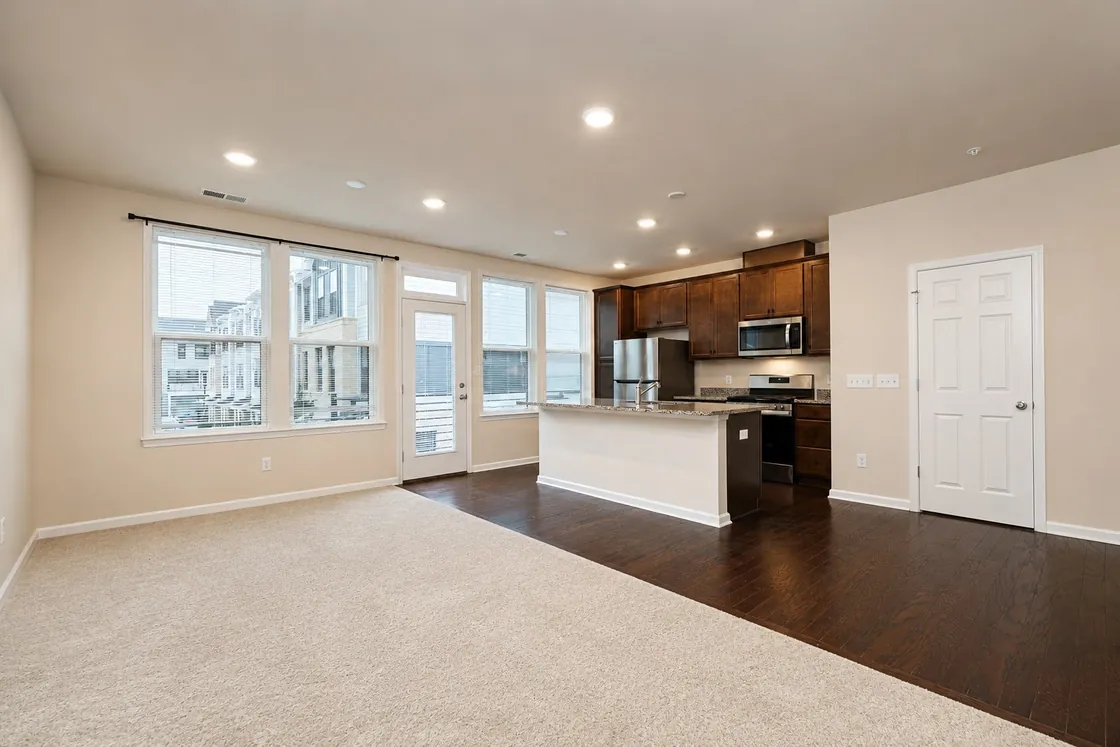
How AI Photo Enhancement Helps Real Estate Listings Stand Out
Learn how AI photo enhancement can help real estate professionals prepare cleaner, brighter, more consistent listing images while preserving the property's authentic appearance.
EstateAI Editorial TeamAugust 9, 20269 min readShare
Property photos are often the first interaction a potential buyer has with a listing. Before reading the full description, reviewing floor plans, or scheduling a viewing, buyers are already forming an impression from the images they see online.
That makes image quality an important part of property marketing.
Real estate photographers and agents regularly work with challenging conditions: inconsistent lighting, dark interiors, blown-out windows, dull skies, mixed color temperatures, and large batches of images that need to maintain a consistent visual standard.
AI photo enhancement can help streamline that process.
Instead of treating every photograph as an isolated editing task, EstateAI connects image enhancement to the complete property workflow. Photos remain associated with the property while professionals can analyze them, improve suitable images, review generated versions, and continue into marketing, sharing, and delivery.
What Is AI Photo Enhancement for Real Estate?
AI photo enhancement uses artificial intelligence to improve the presentation of property photography while retaining the important visual characteristics of the original scene.
For real estate imagery, enhancement should not mean completely reinventing the photograph.
A professional enhancement workflow should focus on presentation improvements such as:
AI is changing more than virtual staging. Discover how photographers, agents, and property marketing teams can use AI throughout the real estate media workflow while keeping professional control.
How AI Photo Enhancement Helps Real Estate Listings Sta…
The objective is to produce a cleaner and more professional photograph while keeping the property recognizable and believable.
This distinction is important.
Image enhancement is different from services such as virtual staging, interior redesign, or virtual renovation. Those services intentionally introduce larger visual changes for specific marketing purposes.
Enhancement is primarily about making the existing photograph look its best.
Why Listing Image Quality Matters
Property search has become highly visual.
Buyers may browse many listings in a short period of time, particularly on mobile devices where photographs occupy much of the available screen.
A poorly presented image can make an otherwise attractive property difficult to understand.
For example, an interior may appear unnecessarily dark because the camera exposure favored bright windows. Another room may have an unnatural color cast caused by a mixture of daylight and artificial lighting.
Neither issue necessarily reflects the real appearance of the property.
Professional enhancement helps correct presentation problems so buyers can evaluate the space more clearly.
For photographers and marketing teams, consistency is equally important. A property gallery containing thirty photographs should feel like one coherent visual presentation rather than thirty independently processed images.
Common Problems AI Enhancement Can Help Address
Real estate photography happens in real environments rather than controlled studios.
That creates several common challenges.
Dark Interior Spaces
Rooms with limited natural light may appear darker in photographs than they feel in person.
Careful enhancement can improve visibility while maintaining realistic shadows and depth.
The goal should not be to make every room unnaturally bright. Instead, important architectural and interior details should remain visible without creating an artificial HDR appearance.
Bright Windows
Interior photography frequently contains a large exposure difference between the room and exterior windows.
If exposure is optimized for the room, windows may become extremely bright. If exposure is optimized for the exterior, the room may become too dark.
A balanced enhancement workflow can improve the overall presentation while avoiding an unrealistic result.
Inconsistent White Balance
Different rooms can contain daylight, warm lamps, LED lighting, and reflected colors from walls or furnishings.
That can create inconsistent color temperatures across a property gallery.
Correcting those differences helps the entire listing feel more cohesive.
Flat or Dull Images
Even technically correct photographs can sometimes lack visual clarity.
Subtle improvements to contrast, exposure, color, and detail can create a stronger presentation without changing the property's fundamental appearance.
Large Property Photo Sets
A photographer may return from a property with dozens of images.
Processing those images individually can become repetitive, particularly when the same general quality standard needs to be maintained across the entire listing.
AI-assisted workflows can reduce repetitive work while allowing professionals to review the final results.
Enhancement Should Preserve the Property
Real estate image enhancement requires a different philosophy from purely creative image generation.
The photograph represents a real property.
Permanent architectural characteristics should therefore remain consistent with the original image.
Walls, windows, doors, flooring, cabinetry, fireplaces, stairs, built-in elements, and other structural details should not casually change during a normal enhancement workflow.
EstateAI's Professional Image Enhancement workflow is designed around preservation-first processing.
The purpose is to improve presentation rather than redesign the property.
When a larger transformation is desired, EstateAI provides separate workflows such as Virtual Staging, Interior Redesign, Virtual Renovation, Decluttering, Day to Dusk, and other specialized services.
Separating these purposes helps professionals choose the correct treatment for each photograph.
How EstateAI Approaches Property Image Enhancement
EstateAI is built around the property rather than around isolated editing tools.
A user begins by creating a Property Workspace and uploading the property's photographs.
From there, the photos remain connected throughout the workflow.
A typical process looks like this:
Create the property.
Upload the original photographs.
Analyze suitable images.
Review AI recommendations.
Select Professional Image Enhancement.
Choose the photographs to process.
Generate enhanced versions.
Review the original and enhanced results.
Continue with additional AI services where appropriate.
Organize, share, download, market, or deliver the finished property media.
This property-first approach means photographers do not need to create a separate disconnected project every time they want to apply another service.
The original photos and generated versions remain associated with the same property.
Upload Once, Use Multiple AI Services
One of the practical advantages of a connected property workflow is that the same photo library can support multiple marketing tasks.
An interior photograph may only need professional enhancement.
A vacant bedroom may benefit from enhancement followed by Virtual Staging.
A furnished but cluttered room may be suitable for Virtual Declutter.
An exterior photograph may be enhanced normally while another exterior image from the same property could be prepared as a Day to Dusk version.
The user does not need to repeatedly upload the property for every treatment.
Instead, different services operate from the same organized Property Workspace.
This reduces unnecessary file handling and helps keep originals, versions, jobs, and final outputs connected.
EstateAI's property analysis can help identify suitable photographs and recommend relevant services based on the available imagery.
For example, recommendations may identify:
images suitable for professional enhancement
vacant interiors that could benefit from staging
cluttered spaces that may benefit from decluttering
exterior photographs suitable for Day to Dusk
seasonal exterior images suitable for specialized treatment
The user remains in control of what gets processed.
Recommendations are intended to help organize the workflow rather than silently apply services.
Original and Enhanced Versions Stay Connected
Version management becomes increasingly important as more AI services are used.
A single original photograph may eventually have several useful outputs.
For example:
Original photograph
→ Professional Enhancement
→ Virtual Staging
→ Interior Redesign
Each output has a different purpose.
EstateAI keeps generated versions connected to the original property media so users can review their options without losing track of where each image came from.
This is particularly useful for photographers and teams working across larger property sets.
AI Enhancement and Professional Photography Work Together
AI enhancement should not be viewed as a replacement for good photography.
Strong source images still matter.
Composition, camera position, lens choice, vertical alignment, focus, and thoughtful capture decisions all contribute to the final result.
AI works best when it helps professionals improve and accelerate the post-production workflow after those photographs have been captured.
For experienced photographers, this can mean spending less time on repetitive adjustments and more time reviewing the images that genuinely require attention.
For agents and marketing teams, it can provide a more structured way to prepare listing media while maintaining a consistent presentation.
When Should You Use Image Enhancement?
Professional Image Enhancement is appropriate when the existing photograph and property presentation are fundamentally correct but the image could benefit from better finishing.
Typical examples include:
interiors that need improved exposure
images with inconsistent color balance
photographs requiring better clarity
dull listing images
property galleries requiring a more consistent finish
exterior photographs needing general presentation improvement
If the goal is to add furniture to a vacant room, Virtual Staging is the more appropriate workflow.
If the goal is to explore different furniture or décor styles, Interior Redesign may be more suitable.
If permanent finishes or materials need to be visualized differently, Virtual Renovation serves a different purpose.
Choosing the correct service helps maintain predictable results.
Benefits for Real Estate Photographers
Real estate photographers frequently work under tight turnaround requirements.
A single day may involve multiple properties, each containing dozens of photographs.
A connected AI workflow can help photographers reduce repetitive processing while maintaining control over the final deliverables.
EstateAI also keeps the work organized by property, which becomes increasingly useful when photographers need to revisit a listing, generate another version, prepare client downloads, or deliver updated assets.
The value is not simply generating one enhanced photograph faster.
The larger benefit is keeping the complete production workflow connected.
Benefits for Real Estate Agents
Agents may not want to manage a complex professional photo-editing workflow.
They usually want listing media that looks professional, remains organized, and can move quickly into marketing.
A property-first platform can help agents manage the process from one workspace.
Photos can be uploaded, reviewed, enhanced, staged where necessary, organized into a gallery, shared, and prepared for marketing without moving between multiple unrelated tools.
That can make property-media preparation easier to understand and manage.
Benefits for Real Estate Marketing Teams
Brokerages and marketing agencies may work with many listings simultaneously.
Consistency becomes especially important at that scale.
A connected workflow can help teams maintain property organization while allowing different members to work with the same media and generated outputs.
Instead of passing files through disconnected folders and applications, the property becomes the central location for the marketing workflow.
Beyond Image Enhancement
Image enhancement is only one stage of property marketing.
Once the photographs are ready, professionals may still need to:
create alternative image versions
review generated results
download final assets
share media with clients
prepare listing copy
organize marketing materials
manage delivery
EstateAI connects these activities to the same Property Workspace.
That is why the platform is designed around properties rather than around individual AI tools.
The goal is not simply to generate an image.
The goal is to help move a property from original photography to market-ready media.
Building a More Efficient Property Marketing Workflow
AI is most useful when it removes unnecessary repetitive work without removing professional control.
For real estate media, that means keeping the user responsible for important decisions while allowing automation to help with analysis, recommendations, processing, organization, and repetitive production tasks.
A connected workflow also reduces the number of times files need to be moved, renamed, uploaded, downloaded, and reorganized.
For photographers handling large volumes of properties, those operational improvements can become just as valuable as the individual AI transformations.
Final Thoughts
AI photo enhancement can help real estate professionals create cleaner and more consistent property imagery while reducing repetitive post-production work.
But enhancement becomes considerably more useful when it is connected to the rest of the property workflow.
EstateAI keeps original photos, AI analysis, recommendations, processing jobs, generated versions, galleries, marketing, sharing, and delivery connected to the same property.
Instead of uploading the same files into multiple independent tools, professionals can prepare the complete listing from one workspace.
For photographers, agents, brokerages, and property marketing teams looking to streamline property-media production, that connected approach is where AI can provide the greatest practical value.
AI photo enhancement uses artificial intelligence to improve elements such as exposure, color balance, clarity, contrast, and overall presentation while preserving the important characteristics of the original property photograph.
Does AI photo enhancement change the property?+
Professional enhancement should primarily improve image presentation rather than redesign the property. Services that intentionally make larger visual changes, such as Virtual Staging or Virtual Renovation, should be treated as separate workflows.
Can EstateAI enhance multiple photos from the same property?+
Yes. EstateAI is built around a Property Workspace where uploaded photographs remain connected to the property and can be selected for appropriate AI services.
Can I use other AI services after enhancing an image?+
EstateAI supports multiple connected AI workflows. Depending on the photograph, additional services may include Virtual Staging, Virtual Declutter, Interior Redesign, Virtual Renovation, Day to Dusk, and other specialized property-image treatments.
Is AI enhancement useful for professional real estate photographers?+
It can help reduce repetitive post-production work and keep larger property photo sets organized while allowing the photographer to review generated results before delivery.
Does EstateAI automatically process every uploaded image?+
EstateAI provides analysis and recommendations, but users retain control over the images they select for processing.
EstateAI
Turn the next property into a complete marketing workflow.
Upload once. Analyze, enhance, stage, review, market, share and deliver from one connected Property Workspace.